
Best app for managing a junior AFL team in Australia
Junior footy runs on PlayHQ and the Play AFL app. Where Stack Team App and TeamSnap fit, and what LineUp adds for the team's week and game day.

For a junior AFL team in Australia, the best app is really two apps. Your league has already chosen the first: community football runs on PlayHQ, and families follow fixtures, scores and ladders in the free Play AFL app. The second is the team’s own tool for the week and for game day: who is coming, who starts on the interchange bench, how long each child has been on the ground, and who kicked the goals. LineUp was built for that second job, for junior sport in New Zealand and Australia, and it knows Australian Rules Football: 18 positions on an oval, four quarters, and goals and behinds. Here is how it sits alongside the apps junior footy families actually use: PlayHQ, Play AFL, Stack Team App and TeamSnap.
What do junior AFL managers actually need?
Australian football asks a lot of a volunteer team manager. A big squad, a big ground, four quarters, and an interchange that keeps moving all game. In junior grades the coach often wants every child to have a run in more than one part of the ground across the season. The manager needs to:
- Get the fixture and the ground to every family, including the away games at ovals nobody has been to before.
- Know who is coming, early. A full side plus a bench is a lot of children to account for, and a short side is a phone call to the club the night before.
- Set the starting team and the interchange bench, with a position for each starter.
- Keep the bench moving so every child gets time on the ground, without a whiteboard and a stopwatch.
- Keep the score, the goal kickers and the small traditions: player of the day, and whose turn it is to bring the oranges.
- Do the league’s paperwork: the line-up, the game sheet and the result in PlayHQ.
The official platform does the last job. The rest usually lives in a group chat, a notebook and somebody’s memory.
How does LineUp handle AFL?
An AFL team in LineUp (shown as AFL in the app) starts at 18 on the field and four quarters of 20 minutes, labelled Q1 to Q4. Both are team settings, so a junior grade with fewer players or shorter quarters is one change. The oval diagram has all 18 positions: Full Back and the two back pockets, the half-back line, the wings and Centre, Ruck, Ruck Rover and Rover, the half-forward line, Full Forward and the two forward pockets.
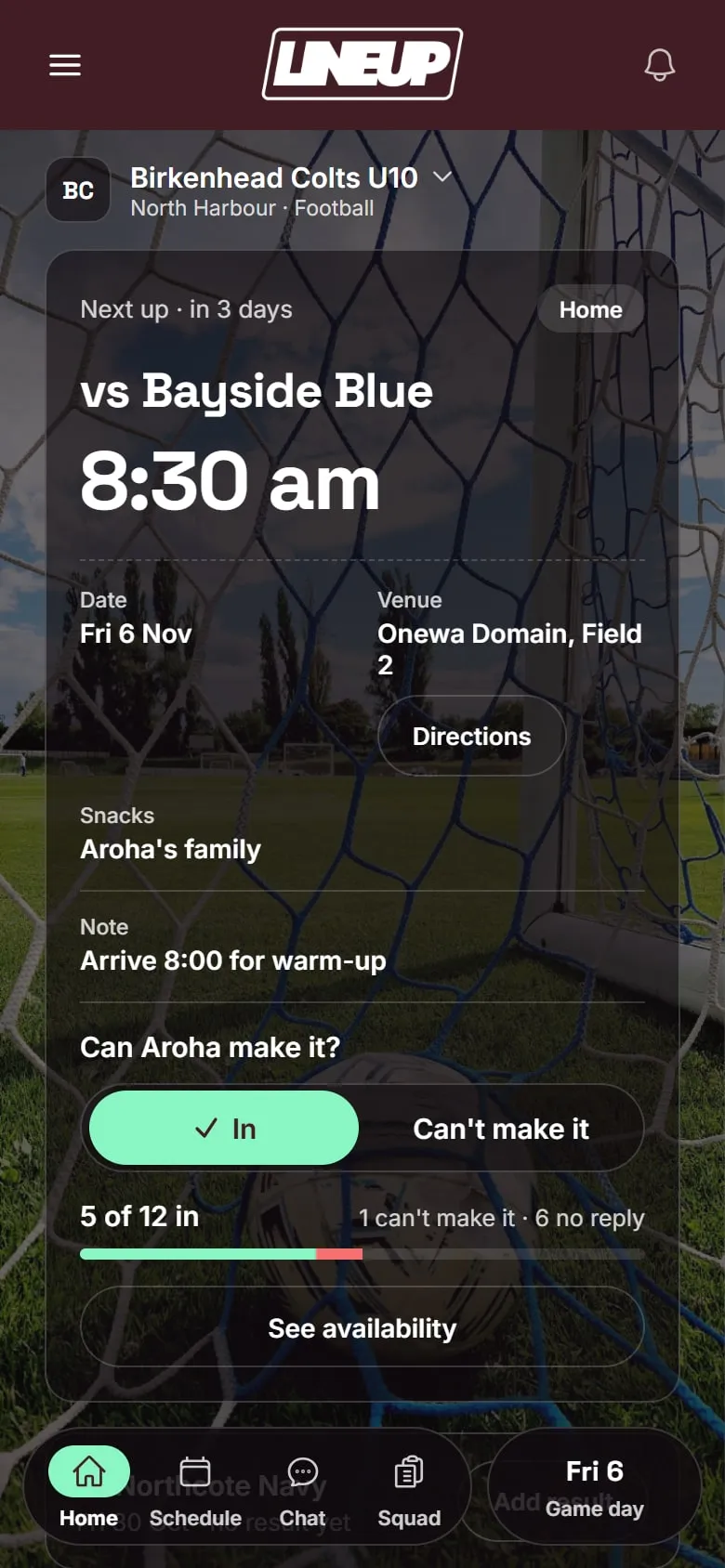
Before the game. Games and trainings go in once; weekly training repeats to the end of the season. Each game has the venue with a map, and families can add it to their calendar. Parents tap In or Can’t make it on each game, and LineUp reminds anyone who has not replied the evening before. You see who is in, who can’t make it and who has not answered.
Picking the team. Start game day and choose the starters and the interchange bench from the players who said In, then give each starter a position on the oval. A child who said In but has not turned up yet can be marked arrived when they get there.
During the game. A live clock runs each quarter and keeps counting past the quarter length; tap to pause. Every player on the ground has a time on count; every player on the bench shows time rested and time played. Open the substitution panel and LineUp suggests who comes off, from a rotation of the starting players in a random order, and who goes on, the longest-rested player on the bench. Next subs shows the following two or three swaps. Tap either name to change it, then Make sub; the player going on takes the position of the player coming off. LineUp does not count or cap interchanges against your competition’s rules. The manager decides.
Scoring. Under the Standard rule you get Goal 6 and Behind 1 buttons, and the score reads the AFL way: 3.4 (22). When your side kicks a goal, LineUp asks “Who kicked the goal?”; for a behind, “Who scored the behind?”. Skip it if you did not see. Undo takes the last score off the board and off the player credited. For grades that do not keep a traditional score, the Junior rule makes each score one point, added with a tap on your side’s score.
After the game. Full time saves the result, the scorers, player of the day if your team picks one, and minutes played for every child. Snack duty follows player of the day. The season record adds up on the team screen.
Which apps do junior AFL teams already use?
The official layer is not the manager’s choice. PlayHQ partnered with the AFL in 2020, and community football leagues and clubs run their registrations, fixtures and results on it.
| The job | Where it happens |
|---|---|
| Registering a child | PlayHQ, with the child as a dependant on a parent’s account |
| Fixtures, ladders, live scores and stats for families | The Play AFL app, or the league’s pages on PlayHQ |
| Line-up, game sheet, best players and the official score | PlayHQ, done by the team manager, with live e-scoring where the league uses it |
| The national AFL and AFLW competitions | AFL Live Official App, which does not cover local footy |
From PlayHQ’s own pages, the AFL’s community football guides and the App Store, checked on 4 October 2026.
How do the alternatives compare?
These are the apps junior footy families in Australia are most likely to have: the two official ones, plus the two club and team apps we found junior AFL clubs telling families to use. We also looked at Spond and Heja, which junior clubs in other sports use, but found no clear sign of them in junior AFL. The table describes what each says it does, as checked on the date shown.
| LineUp | PlayHQ | Play AFL | Stack Team App | TeamSnap | |
|---|---|---|---|---|---|
| What it is | A team app for junior sport | The official registration, competition and scoring platform | The AFL’s free app for community footy, from PlayHQ | A club and team communication app | A general team management app |
| Who chooses it | The team manager | Your league and club | Comes with PlayHQ | Your club or team | Your club or team |
| Availability per game | In / Can’t make it, with a reminder the evening before | Available / Unavailable shows on the manager’s line-up as a warning | Parents mark a child Available or Unavailable when logged in | Event RSVPs and attendance | On the paid Premium and Ultra plans |
| Positions on the ground | All 18 on an oval diagram; the player coming on takes the position | Positions on the line-up, where the league switches them on | Not confirmed | None found | Line-ups, not specific to AFL |
| Game time and interchange | Live quarter clock, time on and rested per player, suggested rotation | Not confirmed | Not confirmed | None found | Not confirmed |
| Scoring during the game | Goals and behinds, with the kicker and Undo | Official e-scoring with goals, behinds and player stats, or the result entered after | Shows live scores and stats from PlayHQ | Can link to ladders, results and live scores | Not confirmed for AFL |
| Feeds the official ladder | No | Yes | Shows the official data | No | No |
| Chat | No | Messaging and notifications from the league and club | Notifications | Group and private chat | Team messaging |
| Do children need accounts? | No | A parent’s account holds the child as a dependant | Uses the PlayHQ account | Not confirmed | Not confirmed |
| Cost | Free to download today | Not confirmed | Free; the App Store listing notes advertising | Free with ads; ad removal A$4.49 a year | Free plan for rosters under 15; Premium from US$10.83 a month billed annually |
Checked on 4 October 2026 against each app’s own website or App Store listing, PlayHQ’s support pages and the AFL’s team manager guides.
PlayHQ is the platform community football runs on. It handles registration, fixtures, team line-ups (with positions where the league switches them on), printable game sheets and the official score, either e-scored live with goals, behinds and player stats or entered after the game along with the best players and goal kickers. When a player is marked unavailable, it shows on the manager’s line-up as a warning; it does not stop that player being picked. It is the system of record, and if your league e-scores, that is where the official score goes.
Play AFL is the free app the AFL points families to, published by PlayHQ. It has fixtures, live scores, ladders, results and player stats for every league on PlayHQ, and it sits at 4.7 out of 5 from around 14,000 App Store ratings in Australia. Logged in with a PlayHQ account, a parent can mark their child available or unavailable for a game. It is for following the competition and seeing the official data; it does not run your bench.
Stack Team App, published by an Australian company, Team Mates Pty Ltd, is the club app we found most often at junior footy clubs, including St Ives Junior AFL Club in Sydney and Midvale Junior Football Club in Perth. It has events with RSVPs and attendance, group and private chat, news, payments, and links to ladders and live scores. It is free with ads, and removing them costs A$4.49 a year. It is a good club noticeboard, but it does not know what a behind is.
TeamSnap is a general team app that some junior footy clubs use; Airport West Football Club in Melbourne tells families its junior games and training are communicated through it. It covers scheduling, messaging and line-ups. Availability tracking is on the paid Premium plan, from US$10.83 a month billed annually on its site, and the free plan is for rosters under 15 players, which is smaller than most footy squads. It is not built around quarters, goals and behinds.
Where LineUp fits
LineUp does not replace PlayHQ or Play AFL. It does not register players, it does not produce the official team sheet, and it does not send results to any competition or ladder. If your league wants the line-up, the best players and the score in PlayHQ, that stays your job.
What LineUp adds is the team’s own week and game day, in one place: In or Can’t make it from every family with a reminder, the starting team and the interchange bench on an oval diagram, a quarter clock with time on and time rested for every child, a suggested rotation so the bench gets its turn, goals and behinds with the kickers, player of the day and the snack roster. Parents join with one invite code from the manager, and another parent can manage the team with you. There is no chat in LineUp, by design, so it does not compete with whatever your club already uses to talk.
If a club is thinking about one app for every junior footy team it fields, we would like to hear about it.
Questions to ask before you choose
- Who has to sign up? If each parent needs a new account and password before they can say whether their child is playing, some never will. LineUp needs one invite code, and the child has no account.
- What does the free plan include? Roster caps and ads on the free tier are common. Check the cap against a footy squad with fill-ins, and the paid price for a whole season.
- Does it know footy? Ask what the app does when a kick hits the post. If it cannot record a behind, or show 3.4 (22), the score is going back in a notebook.
- What does it do with the children’s details? Names on a line-up are one thing; accounts, photos and chat for nine-year-olds are another. Know what is collected and who sees it.
- Can two parents run it? The manager will miss a weekend. The team should not live on one phone.
Which should you pick?
- Register, follow the competition and enter official results in PlayHQ and Play AFL. That is not optional, and it is not a job LineUp tries to do.
- If your club already runs Stack Team App or TeamSnap for news, events and chat, keep it for the club.
- If you want the bench, the quarters and the score handled on the day, with time on for every child and the goal kickers saved without a notebook, LineUp is built for that.
- If you look after a club’s worth of junior teams, tell us about your club.
How a team gets started takes three steps. To see a full game from the first bounce to the final siren, read Goals, behinds and rotations: junior AFL scoring in LineUp, or see everything we have written about AFL.
Details about other apps were checked on 4 Oct 2026. Their features and prices change; check their own sites before you decide.
Questions people ask
- Does LineUp replace PlayHQ for junior footy?
- No. PlayHQ is where your league runs registration, the fixture, the official line-up and the result. LineUp does not register players, produce official team sheets or send scores to a ladder; it is the team's own tool for the week and for game day, used alongside PlayHQ.
- Does LineUp know about goals and behinds?
- Yes. With the Standard scoring rule you get Goal 6 and Behind 1 buttons, and the score shows the AFL way, such as 3.4 (22). For grades that do not keep a traditional score, the Junior rule makes each score one point, added with a tap on your side's score.
- Our juniors play fewer than 18 a side. Does that work?
- Yes. LineUp starts an AFL team at 18 on the field and four quarters of 20 minutes, and both are team settings. A grade with fewer players or shorter quarters is a change you make once.
- Is LineUp free?
- LineUp is free to download today on iPhone from the Australian App Store and on Android from Google Play. There are no ads and no tracking in the app, and children do not have accounts.
- Does LineUp have team chat?
- No. LineUp has the schedule, In or Can't make it for each game, and a reminder the evening before to anyone who has not replied. If your club already runs chat somewhere else, keep it there.