
Best app for managing a junior rugby league team in NZ and Australia
Who's playing Saturday, the interchange and the score: how LineUp sits alongside MySideline, MyLeague, Sporty, CoachMate and Stack Team App for junior league.

For a junior rugby league team, the best app is the one that gets every family to say whether their child is playing on Saturday, then helps you run the interchange, the clock and the score from the sideline. In both countries, registration, the draw and the official result already belong to the governing body: in Australia that is the NRL’s MySideline system, reached through PlayRugbyLeague, and in New Zealand it is NZRL’s Sporty platform. LineUp sits alongside those as the team’s own tool for the week and game day. Here is how it compares with the apps junior league families actually use: MySideline, the NRL’s MyLeague app, Sporty, CoachMate and Stack Team App.
What do junior rugby league managers actually need?
Rugby league asks a lot of a volunteer manager: thirteen on the field, a bench for the interchange, two halves, and a team list deadline on top. Across a season, the manager needs to:
- Get the draw to the families, with the ground, the kick-off time and any change.
- Know who is playing, early enough to fill the team list. Thirteen on the field means a short Saturday is a real problem.
- Run the interchange, so the bench gets its turn and nobody spends the whole game on it.
- Keep the positions straight, because a substitute who wanders into the wrong spot leaves a hole in the line.
- Record the score and the small traditions: who scored the tries, who kicked the goals, player of the day, whose turn for the oranges.
The official platforms do the team list and the official score well. The week before usually runs on a group chat (one club handbook we read tells managers to set up a text or WhatsApp group), and the bench on the day runs on a notebook.
How does LineUp handle rugby league?
LineUp has rugby league’s shape built in. A Rugby League team defaults to thirteen on the field and two halves of 30 minutes, labelled H1 and H2. Junior grades with fewer players or shorter halves are a change in team settings. The field diagram uses the real positions: Left Prop, Hooker, Right Prop, Left Second Row, Right Second Row, Lock, Halfback, Five-eighth, Left and Right Centre, Left and Right Wing, and Fullback.
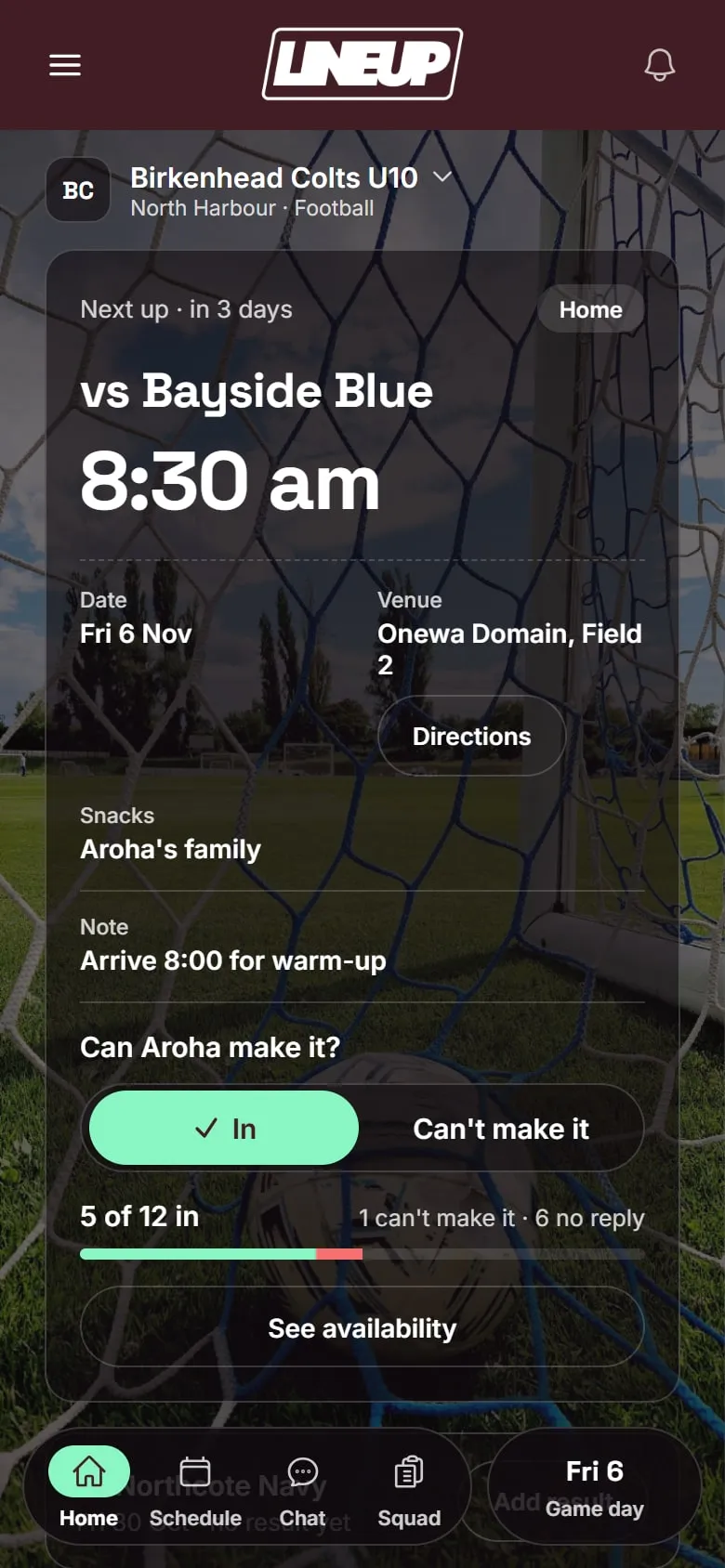
Before the game. Games and trainings go in once, and weekly training repeats to the end of the season. Each game has the venue with a map, and families can add it to their calendar. Parents tap In or Can’t make it for each game. You see who is in, who can’t make it, and who has not replied, and LineUp reminds anyone who has not answered on the evening before.
Picking the team. On game day you choose the starters and the bench from the players who said In, and give each starter a position on the diagram. A player who said In but has not turned up yet can be marked as arrived later.
During the game. The clock runs each half and keeps counting past the set length, and you pause it with a tap. Every player on the field has a time on count, and every player on the bench shows time rested and time played, updated every second. When you open the substitution panel, LineUp suggests who comes off, from a rotation of the starting players in a random order, and who goes on, which is the player who has rested longest. You can change either name, then tap Make sub. The player coming on takes the position of the player going off. LineUp does not count or limit interchanges against your competition’s rules. That stays with you.
Scoring. Choose a scoring rule set in team settings. Standard has a button each for a try (4), a conversion (2), a penalty goal (2) and a field goal (1). Junior has a single Try button worth one point, for grades that count tries only. When your side scores, LineUp asks who scored, or who kicked the conversion, and you can skip it. Undo takes the last score back off the board and off the player it was credited to.
After the game. Full time lands on the game’s summary: the result, the scorers, player of the day if your team picks one, and minutes played for every player, all saved to the season. Snack duty follows player of the day, and the season record sits on the team screen.
For families. Parents join with one invite code. Children do not have accounts; you add the players’ names. One parent account can follow several children and teams, and another parent can manage the team with you. Set the team colour and logo, and the app takes on your colours.
Which apps do junior rugby league teams already use?
The registration and competition platform is chosen for you, by the country you play in.
| Where you play | Registration | Draw, team lists and official score |
|---|---|---|
| Australia | PlayRugbyLeague, on the NRL’s MySideline system, with an NRL Account | MySideline Manager for team lists and live scoring; the NRL MyLeague app for families to follow draws and results |
| New Zealand | Sporty, NZRL’s platform | Sporty, with a Sporty-built game day app for team sheets and live scoring |
From the NRL, NSWRL, NZRL and Sportsground pages and guides, checked on 4 October 2026.
Use these for registering, the team list and the official result.
How do the alternatives compare?
These are the apps junior rugby league families are most likely to meet. The table describes what each says it does.
| LineUp | MySideline and MySideline Manager | MyLeague | Sporty and its game day app | CoachMate | Stack Team App | |
|---|---|---|---|---|---|---|
| What it is | A team app for junior sport | The NRL’s registration and competition system, with a manager tool for team lists and scoring | The NRL’s community rugby league app for following competitions | NZRL’s registration and competition platform, with an app for team sheets and scoring | NZRL’s official coaching and team management app | A club and team communication app |
| Where it is used | New Zealand and Australia | Australia | Australia | New Zealand | New Zealand | Clubs in both |
| Who chooses it | The team manager | The NRL, through your club and league | The NRL | NZRL and your district | NZRL offers it; the coach or manager sets the team up | Your club or team |
| Availability per game | In / Can’t make it, with a reminder the evening before | None found; training attendance only | None found | Not confirmed | RSVPs for games and trainings | Event RSVPs |
| Interchange and game time | Live clock, time on and rested per player, suggested rotation | Records each interchange, player off and player on | No | Team sheets; interchanges not confirmed | None found | No |
| Scoring during the game | Standard or Junior scoring, with scorers and Undo | Live scoring of tries, goals and sin bins | Shows live scores | Live scoring by the home team | None found | Live scores can be posted |
| Feeds the official result | No | Yes | Shows it | Yes | No | No |
| Chat | No | None found | None found | Links to Sporty Chat2Team | Team Chat with photos and polls | Group and private chat |
| Do children need accounts? | No | Registration runs through an NRL Account set up by the parent | Not confirmed | Not confirmed | Not confirmed | Not confirmed |
| Cost | Free to download today | Not confirmed | Free app | Not confirmed | Free, according to NZRL | Free with ads; ad removal A$4.49 or NZ$4.99 a year |
Checked on 4 October 2026 against each app’s own website or app store listing, and NRL, NSWRL, NZRL and club guides.
MySideline is the NRL’s national system for community rugby league, and families meet it through the Register button on PlayRugbyLeague. Team managers use MySideline Manager, which their club gives them access to, to pick the team list for each fixture, record training attendance, report injuries and live-score the game, tapping in tries, goals and sin bins. It also records each interchange. In the Parramatta junior league handbook, for example, managers must submit the team list by 9pm on the Thursday, and the home team manager live-scores from the under 10s up. It is built to get the official record right, not to plan the bench.
MyLeague is the NRL’s app for the community game, free from National Rugby League Limited. It shows fixtures, ladders, results and live scores, with maps to the venue and coaching videos. It averages 3.1 out of 5 from 324 ratings on the Australian App Store. It is for following the competition rather than organising a team.
Sporty is NZRL’s platform, built by Sportsground, a New Zealand company, and NZRL’s own site sends people there to register and for draws and results. On game day, a Sporty-built app lets the team’s scorer pick a team sheet from the registered squad, score the game and submit the result; Aotearoa NZ Māori Rugby League, for one, publishes a guide to its own version. Sportsground says its game day app connects to its Chat2Team messaging.
CoachMate is a New Zealand app that NZRL launched on in 2025 as its official coaching and team management app. It has NZRL practice plans with short videos, a season schedule with RSVPs, and Team Chat with photos and polls. We found nothing in it for running the game itself, the interchange or the score.
Stack Team App is an Australian-made, ad-funded club app with news, events and RSVPs, chat and payments. Junior league clubs such as Carlingford Cougars use it for club communication. It averages 3.8 out of 5 from 8,100 ratings on the Australian App Store. It knows nothing about positions or the interchange.
Where LineUp fits
LineUp does not replace MySideline or Sporty. It does not register players and it does not send results to any competition or ladder. If your league asks you to submit a team list by Thursday night or live-score the game, keep doing that in MySideline Manager or the Sporty app.
What LineUp adds is the team’s own week and game day, the same way in every state and in New Zealand: In or Can’t make it from every family with a reminder, all thirteen positions on a field diagram, time on and time rested for every player, a suggested rotation for the bench, the scorers, player of the day and the snack roster. We found no per-game availability in the official tools, so this is the gap the group chat usually fills.
If your club is thinking about one app for all its junior teams, we would like to hear about it.
Questions to ask before you choose
- Who has to sign up? If every parent needs a new account and a password before they can answer for Saturday, some never will. LineUp needs one invite code and no account for the child.
- What does it cost, and what pays for it? Some team apps are paid for with ads, some by the club, some by a per-season fee. Know which before the season depends on it.
- Does it know rugby league? Ask what the app does at half time.
- What does it do with the children’s details? Know what is collected about a ten-year-old, and who can see it.
- Can two parents run it? The person who set up the season will miss a game. The team should not live on one phone.
Which should you pick?
- Register, submit team lists and enter official scores in whatever your country uses: MySideline through PlayRugbyLeague in Australia, Sporty in New Zealand. That is not optional, and it is not a job LineUp tries to do.
- Follow the draw in MyLeague in Australia, or on Sporty in New Zealand.
- If you coach in New Zealand and want ready-made training plans, CoachMate has NZRL’s.
- If your club runs Stack Team App, keep it for club news.
- If you want the week and the game handled for your team, from who is playing to the interchange, the scorers and minutes saved to the season, that is what LineUp is built for.
- If you look after a club’s worth of junior teams, tell us about your club.
Whichever you choose, it only works if the families use it. That is why LineUp asks for one invite code and a tap. Here is how a team gets started.
To see a full Saturday, read Game day for junior rugby league in LineUp: interchange and scoring, or browse everything we have written about rugby league.
Details about other apps were checked on 4 Oct 2026. Their features and prices change; check their own sites before you decide.
Questions people ask
- Do I still need MySideline or Sporty if I use LineUp?
- Yes. LineUp does not register players and does not send results to any competition or ladder. Keep submitting your team list and entering official scores wherever your league or district asks you to.
- Does LineUp know rugby league positions?
- Yes. A Rugby League team has all thirteen positions on the field diagram, from the props and hooker to the fullback. When you make an interchange, the player coming on takes the position of the player going off.
- Our grade only counts tries. Does the scoring work?
- Yes. Set the scoring to Junior in team settings and you get a single Try button worth one point. The Standard setting has buttons for a try, a conversion, a penalty goal and a field goal.
- Is LineUp free?
- LineUp is free to download today on iPhone and Android. There are no ads and no tracking in the app, and children do not have accounts.
- Does LineUp have a team chat?
- No. LineUp has no chat. It covers the fixture, who is playing and the game itself, so a team that likes its group chat for photos and banter can keep it.