
Game day for junior rugby league in LineUp: interchange and scoring
A junior rugby league Saturday in LineUp: who's playing, thirteen positions on the field, the interchange, tries and goals, and the result saved at full time.

A junior rugby league game day in LineUp starts days before kick-off, when you can see who has said In, and ends a minute after full time, when the result, the try scorers, the goal kickers, player of the day and everyone’s minutes are saved to the season. In between, the app runs the clock for each half, shows all thirteen positions on a field diagram, counts time on and time rested for every player, and suggests the next interchange so the bench gets its turn. This is the whole Saturday, in order.
What does rugby league game day look like in LineUp?
Three screens. The fixture before the game, where you see who is playing. The live screen during it, with the score for both sides, the clock, the substitution panel, the field diagram and the bench. And the game’s summary after full time.
A Rugby League team in LineUp defaults to thirteen on the field and two halves of 30 minutes, labelled H1 and H2. If your grade plays fewer a side or shorter halves, as the youngest mini footy grades do, change it once in team settings and every game follows. The field diagram uses the real positions: Left Prop, Hooker, Right Prop, Left Second Row, Right Second Row, Lock, Halfback, Five-eighth, Right Centre, Left Centre, Right Wing, Left Wing and Fullback.
Before the game
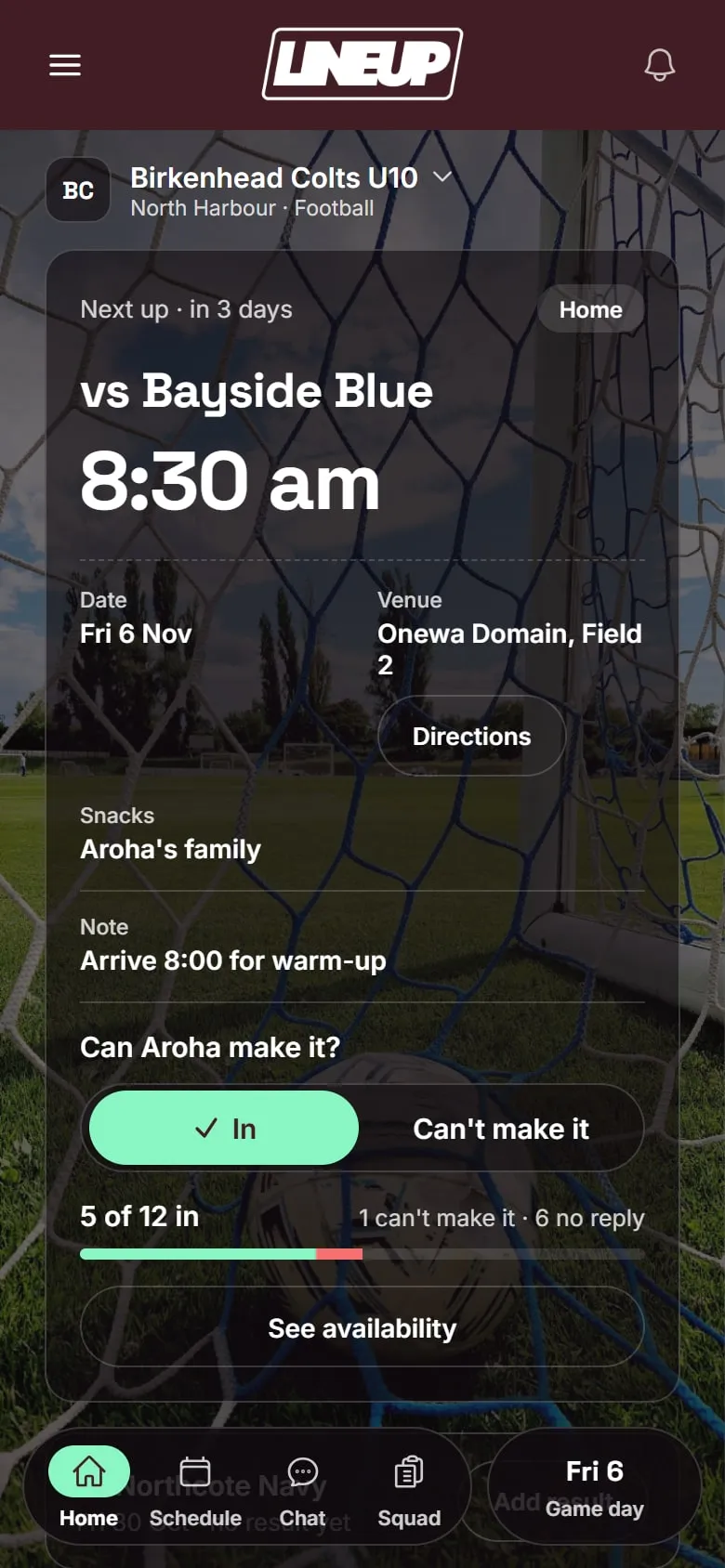
The fixture is already there. You added the season’s games once, with the ground and the kick-off time, and weekly training repeats to the end of the season. Each game has the venue with a map, and parents can add it to their calendar. When the draw changes, you change the fixture and every family sees the new details.
You know who is playing. Parents tap In or Can’t make it on each game. On the evening before, LineUp reminds anyone who has not answered. The availability screen lists the whole squad: who is in, who can’t make it, and who has not replied. If your league wants the team list submitted by Thursday night, you can see who is available before you fill it in.
Families joined with one code. When you set the team up, LineUp gave you an invite code. Each parent joined with it. Children do not have accounts; you add the players’ names. A parent with two children in two age groups follows both teams from one account. How a team gets started is three steps.
Setting the team up for rugby league
If the season has not started yet, ten minutes of setup makes every Saturday shorter.
- Create the team and choose Rugby League. Check the players on the field, the number of halves and the minutes per half against your grade.
- Choose the scoring. Standard gives you a button each for a try (4 points), a conversion (2), a penalty goal (2) and a field goal (1). Junior gives you a single Try button worth one point, for grades that count tries only.
- Add the roster. Every player’s name, once. Parents attach themselves when they join.
- Add the games from the draw, with the ground and kick-off time, and add training once to repeat weekly.
- Turn on what your team does. Player of the day, snack duty, both or neither. Set the team colour and add the club logo, and the app takes on your colours.
- Share the invite code, and add a second parent as a manager so the team does not live on one phone.
Picking the thirteen
Tap Start game day on the fixture. LineUp lists the players who said In. Choose your starters and your bench, which is your interchange for the day, then give each starter a position. The field diagram fills in as you go, so you can see the forwards, the halves and the outside backs in their places before the kick-off. A player who said In but is not at the ground yet can be marked as arrived when they turn up, and goes onto the bench.
During the game
The clock. Start it when the referee does. It shows the minutes of the current half and keeps counting past the set length, so if the half runs long you can see by how much. Tap to pause for an injury or a long stoppage.
Time on and time rested. Every player on the field has a count of their time on. Every player on the bench shows how long they have rested and how long they have played. Both update every second. A glance tells you who has been on since kick-off and who has been sitting the longest, without adding anything up.
The interchange. Open the substitution panel and LineUp has already filled it in. Off is the next player in the rotation. On is the player who has rested longest. The rotation is every starting player in a random order; each comes off once before the cycle starts again, and the order reshuffles each cycle, so the same child is not first off every week. Under the pair, Next subs shows the following two or three swaps. Tap either name to choose someone else, then tap Make sub. The player coming on takes the position of the player going off, the diagram updates, and the player who came off starts resting.
Moving positions. Tap a player on the field diagram to swap their position with another. If the coach wants the five-eighth and the halfback to change places for the second half, tap one of them and swap.
Interchange limits. Competitions set their own rules on interchanges, and they vary. The 2025 Parramatta junior league handbook, for example, caps Gold divisions at ten interchanges and leaves Silver and Bronze unlimited. LineUp does not count interchanges against any limit. It shows you the minutes and offers a turn. The manager decides, and the official interchange record, if your competition keeps one, stays where it is kept.
Half time. Tap End H1 and the break screen appears with the score, the substitution panel, the field and the bench. Half time is when a junior coach often makes a batch of changes, so the screen is built for that. Tap Start H2 when the referee is ready.
A worked example: one Saturday’s interchange
Say your team is set to thirteen on the field and two halves of 25 minutes, and sixteen players said In. Thirteen start. Kahu and Sione are on the bench. Lachie said In but is not at the ground at kick-off, so he is not in the squad yet.
Ten minutes in. Lachie turns up. One tap marks him arrived and puts him on the bench, and his rest time starts counting.
Twelve minutes in. There is a stoppage for an injury, and the coach wants fresh legs in the forwards. Open the panel: Off is Ollie, the Left Prop, and On is Kahu, who has rested the full twelve minutes. Make sub. Kahu is now the Left Prop. The next suggestion is Off Jack, the Lock, On Sione. Make sub. Ollie and Jack start resting.
Half time. End H1. The bench shows Ollie and Jack with about thirteen minutes rested, and Lachie with fifteen. The coach wants Kahu, a strong runner, at Lock rather than prop, so tap Kahu on the diagram and swap him with Sione. Then open the panel: Off is Mason, the Fullback, and On is Lachie, the longest rested. Make sub. Lachie takes Fullback. The next suggestion is Off Ari, the Halfback, On Ollie. The coach would rather bring Jack back, so tap the On name and pick Jack. Make sub, and Jack takes Halfback. The diagram shows the new thirteen. Start H2.
Second half. Twice more the panel offers a swap, and the coach takes one and changes the name on the other. By full time, the summary shows every player’s minutes, and the coach can see at a glance who spent longest on the bench.
Nothing in that was decided by the app. It counted, and it offered the next turn. The coach chose.
Scoring
Standard scoring. Mason scores in the corner: tap Try 4, and LineUp asks who scored. Pick Mason. Ari lines up the conversion and it goes over: tap Con 2, and LineUp asks who kicked the conversion. Pick Ari. A penalty goal or a field goal works the same way, with its own button. If you missed who it was, skip the question and the points still count.
Junior scoring. If your grade counts tries only, each try is worth one point: tap your side’s score to add it, and LineUp asks who scored.
The other side. The same buttons sit under their score. Tap the one for what they scored; LineUp adds the points and asks nothing, because it keeps scorers for your team only.
Undo. The referee calls the try back for a forward pass. Tap Undo and the last score comes off the board, and off the player it was credited to.
Full time
At the end of the second half, end the game. If your team picks a player of the day, choose them now so the award is saved with the result. LineUp lands on the game’s summary: the result, the try scorers and goal kickers, player of the day, and minutes played for every player. It is saved to the season straight away, and everyone on the team can open it.
Snack duty. If your team has oranges or lollies turned on, the roster follows player of the day, so the next family knows it is their turn without anyone keeping a list.
The season. The team screen keeps the season record, adding each result as you go.
The official result. LineUp does not send anything to the competition. Enter the official score and confirm the result wherever your league or district asks, in MySideline Manager in Australia or the Sporty app in New Zealand.
A few things managers ask
Can I set positions for the second half in advance? Not as a stored plan. Next subs shows where the rotation is heading, and the half-time screen is where you make the changes, with the bench’s rest times in front of you.
A player gets hurt. What do I do? Make an interchange like any other. Their time on stops, and the rotation carries on.
Can the other manager run game day while I am away? Yes. Another parent can manage the team with you, and whoever is at the ground runs the game from their own phone.
If you are still choosing an app, Best app for managing a junior rugby league team in NZ and Australia sets LineUp alongside MySideline, MyLeague, Sporty, CoachMate and Stack Team App. More on the sport is here, and if you look after a club of junior league teams, get in touch.
Questions people ask
- Does LineUp count interchanges against our competition's limit?
- No. LineUp records who is on the field and who is resting, and suggests the next swap, but it does not count or limit interchanges against any competition's rules. Keep track of your grade's limit yourself.
- What happens to a position when I make an interchange?
- The player coming on takes the position of the player going off, so the field diagram stays complete. To move players around, tap a player on the diagram and swap their position with another.
- Can I record who kicked the goals?
- Yes, with the Standard scoring rule set. Tap Con 2, Pen 2 or FG 1 and LineUp asks who kicked it. You can skip the question if you did not see.
- Do I still submit the team list to MySideline or Sporty?
- Yes. LineUp does not register players or send anything to the competition. Your official team list and official score still go wherever your league or district asks for them.
- What do parents see?
- Before the game, parents see the fixture, the venue and their own reply. The live screen is the manager's. After full time, everyone on the team can open the game and see the result, the scorers and player of the day.