
Best app for managing a junior football team in NZ and Australia
What a junior football manager needs from an app, and how LineUp sits alongside Dribl, Squadi, Sporty, Stack Team App and Friendly Manager in NZ and Australia.

If you manage a junior football team, the best app is the one that gets every family to answer “are you coming on Saturday?” without you chasing them, and then helps you run the game itself: who’s on, who’s had a rest, what the score is. In New Zealand and Australia part of that is already decided for you: your federation’s system handles registration, the draw and the official result. This article explains what that system does and does not do for a team, and compares LineUp honestly with the apps junior football families in both countries actually use: Dribl, Squadi, Sporty with MyFootball Manager, Stack Team App and Friendly Manager.
What does a junior football manager actually need?
Start with the week, not the app. A junior football season in New Zealand or Australia looks like this: a game most Saturdays, usually a training in the week, a roster of somewhere between nine and fifteen kids, and a group of parents who are generous with their time and short on attention. The manager, who is almost always a parent who put their hand up at the first training, needs to:
- Get the fixtures in front of everyone once. Venue, time, which field, what to bring. The group chat buries this under forty messages about oranges.
- Know who is coming. By Thursday night, ideally, so the team is not short on Saturday morning.
- Run the game from the sideline. For nine-a-side with a bench of four or five, that means knowing who has been on, who has sat the longest, and making the sub without a clipboard.
- Remember the small things. The score, who scored, player of the day, whose turn it is for the half-time oranges.
That last list is where general-purpose team apps thin out. They were designed around scheduling and chat, with sport-specific features bolted on later, if at all. A football manager ends up with the fixtures in one app, the subs in their head, and the oranges in the chat.
How does LineUp handle football?
LineUp is a team app for junior sport, so football’s shape is built in rather than configured around. The default for a Football team is nine players on the field and two halves of 25 minutes, and you change any of those in team settings for a 7-a-side or 11-a-side grade.
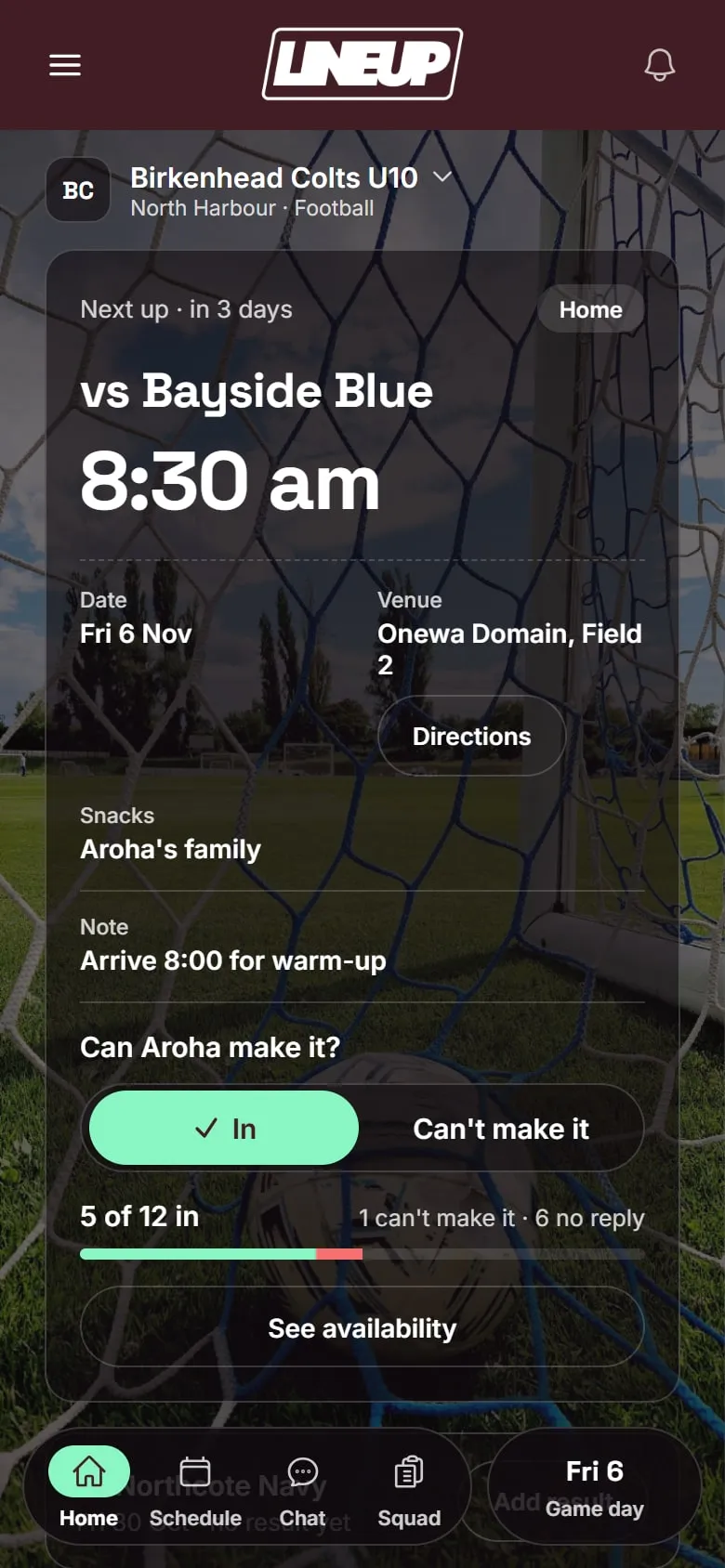
Before the game. You add games and trainings once. Weekly training repeats to the end of the season on its own. Each fixture carries the venue, with a map, and the time. Parents tap In or Can’t make it on the fixture, and the night before a game LineUp sends a reminder to anyone who has not answered. You see the replies per game, including who has not replied, so the Thursday-night chase is a glance at a list, not a thread.
On game day. You pick the starters and the bench, and the positions if you want them on the field diagram. Then the clock runs. LineUp counts time on for every player on the field and time rested for every player on the bench. When you are ready to make a change, it suggests who comes off next from a rotation of the starting players, in a random order so nobody is always first off, and who goes on, which is whoever has rested longest. You can override either side of the swap. Two taps and the sub is made; the bench updates; the clock keeps going. There is no score for anyone’s game time and no judgement. The app shows you the minutes and suggests a turn; you decide.
Scoring. Tap the score up for either side. When your team scores, LineUp asks who scored, and you can skip that if you did not see. There is an Undo for the tap that went astray.
After the whistle. Full time lands on the game’s own summary: the result, the scorers, player of the day if you pick one, and minutes played for every player. It all saves to the season, and snack duty rolls to the next family automatically, because it follows player of the day.
For parents. They join with one invite code from you. Their child does not need an account. They see the fixtures, the map, the directions, and they tap In or Can’t make it. If they have two children on two teams, both teams sit in the same app.
Which apps do junior football teams already use?
Before choosing anything, know what your federation has already chosen. Every Australian player registers through PlayFootball, Football Australia’s national registration system, before playing club football or MiniRoos. Draws, results and match sheets then run on a federation competition app, which depends on your state. In New Zealand, New Zealand Football moved registration and competitions to Sporty from 1 January 2026, replacing COMET.
| Where you play | Registration | Draw, results and match day |
|---|---|---|
| New South Wales (associations on Dribl), ACT, South Australia, Tasmania, Victoria | PlayFootball | Dribl |
| Queensland, Western Australia, Northern NSW premier competitions | PlayFootball | Squadi |
| New Zealand | Sporty | Sporty, with the MyFootball Manager app for team sheets and scores |
From each federation’s own announcements and guides, checked on 4 October 2026.
You do not get to choose these, and you should use them for what they are for: getting registered and getting the official result onto the ladder.
How do the alternatives compare?
These are the apps junior football families in New Zealand and Australia are most likely to meet, the federation systems above plus the two club tools that come up most. The table describes what each says it does, as checked on the date shown.
| LineUp | Dribl | Squadi | Sporty and MyFootball Manager | Stack Team App | Friendly Manager | |
|---|---|---|---|---|---|---|
| What it is | A team app for junior sport | A federation competition and match-day app | A federation competition, registration and team app | New Zealand Football’s registration and competition system, with a team-sheet and scoring app | A club and team communication app | A club administration platform |
| Where it is used | New Zealand and Australia | Australia: NSW, ACT, SA, Tasmania, Victoria | Australia: Queensland, WA, Northern NSW premier competitions | New Zealand, all NZ Football clubs | Clubs in both | Clubs in New Zealand |
| Who chooses it | The team manager | Your federation | Your federation | New Zealand Football | Your club or team | Your club |
| Availability per game | In / Can’t make it, with a reminder the evening before | Availability tracking | Yes/no attendance the manager can see | Not confirmed | Event RSVPs | Attendance tracking |
| Game clock, subs and game time | Live clock, time on and rested per player, suggested rotation | Electronic match sheet; Football NSW enters subs for senior grades; no game-time tracking found | Electronic match cards and game-time stats | Team sheets; subs not confirmed | No | No |
| Scoring during the game | Yes, with scorers and Undo | Live scoring | Live scores | Live scoring | Live scores can be posted | Not confirmed |
| Feeds the official ladder | No | Yes | Yes | Yes | No | No |
| Chat | No | Not confirmed | Team and direct chat | Chat2Team, started by the manager | Group and private chat | Club communications |
| Do children need accounts? | No | A parent links the child’s record as a guardian, matching the PlayFootball registration | A player profile, after PlayFootball registration | Only the people scoring or picking teams need logins | Members sign up by email | Club membership |
| Cost | Free to download today | Free app; calendar sync is a premium feature | Free app; Queensland fees are paid through it | Free to clubs under the New Zealand Football deal | Free with ads; ad removal A$4.49 a year | Paid by the club, from US$30 a month for up to 50 members |
Checked on 4 October 2026 against each app’s own website or app store listing, and federation announcements and guides.
Dribl is the competition system for most of southern and eastern Australia. Football NSW (for the associations on it), Capital Football, Football SA, Football Tasmania and, from December 2025, Football Victoria all run on it, from MiniRoos up. It handles fixtures, ladders, availability and electronic match sheets, and the results feed the ladder. It is built to get the official match sheet right rather than to run a junior team’s rotation from the sideline.
Squadi, also Australian, is the competition app for Football Queensland, including community juniors and MiniRoos, and for Football West. It is the most complete of the federation apps: attendance, team chat, match cards, live scores and game-time stats, and in Queensland every player must be active in it to be named on a team sheet.
Sporty, with the MyFootball Manager app, has been New Zealand Football’s national system since January 2026, covering more than 400 clubs and 176,000 players. Managers build team sheets from the squad and enter live scores, and Chat2Team gives a team a free chat. It is new, and still bedding in.
Stack Team App, which started in Melbourne, is a free, ad-funded club app with events and RSVPs, group chat, news and payments. It is general-purpose rather than built for football, and it does not run a game.
Friendly Manager is a New Zealand club administration platform for registrations, communication, attendance and competitions, paid for by the club. It is a tool for the committee rather than for the manager on the sideline.
Where LineUp fits
None of the federation apps is optional, and LineUp does not try to replace them. It does not register players and it does not send scores to the ladder. What it does is the team’s own week and the team’s own Saturday, in the same way in every state and in New Zealand: the fixtures and training, In or Can’t make it from every family, a live clock with time on and time rested for every child, a suggested rotation for the bench, the scorers, player of the day and the snack roster. A manager can set it up in ten minutes without waiting for the club, and a family with one child in Brisbane and another in a different grade gets both teams in one app.
If your club wants one approach for every team, that is a conversation worth having with the club, and we are happy to be part of it.
Questions to ask before you choose
Whichever way you lean, these are worth asking of any app before a season depends on it.
- Who has to sign up? If every parent needs an account and a password before they can say yes to Saturday, some never will. LineUp needs one invite code and no account for the child.
- What does the free plan actually include? A roster cap of fifteen is fine for 7-a-side and tight for 11-a-side with fill-ins. Check the cap, the ads, and what the paid tier costs per season.
- Does it know the sport? A calendar app with a “match” event type is not the same as an app that knows nine players, two halves and a bench. Ask what happens at half time.
- What does it do with the children’s details? Names on a team sheet are one thing; accounts, photos and chat for under-13s are another. Know what the app collects and who can see it.
- Can two parents run it? Someone will be away. The season should not live on one phone.
Which should you pick?
Your federation’s system is not a choice: register in PlayFootball or Sporty, and use Dribl, Squadi or MyFootball Manager for the official match sheet when your competition asks for it. The question for a team manager is what runs the week and the Saturday.
- If your federation app already gives your team availability and chat and your families use it, that may be enough for the week.
- If your club runs Stack Team App or Friendly Manager, keep it for club news and admin.
- If you want the game itself handled in any grade, time on and rested for every child, subs in two taps, the score and the scorers recorded without a notebook, that is what LineUp is built for, and you can start it yourself.
- If you run more than a few teams and want one place for all of them, tell us about your club and we will talk it through.
Whatever you choose, the thing that matters most is that every family actually uses it. That is why LineUp has one invite code, no account for the child, and nothing to learn beyond In or Can’t make it. Here is how a team gets started.
To see how LineUp runs a Saturday from the first whistle, read How LineUp runs a junior football game day, or browse everything we have written about football.
Details about other apps were checked on 4 Oct 2026. Their features and prices change; check their own sites before you decide.
Questions people ask
- Does every parent have to sign up for the team app to work?
- They need to join to reply In or Can't make it, but with LineUp that is one invite code and no account for the child. A parent who never joins still appears on the team sheet as no reply, so the manager can see who to chase.
- Does LineUp work for 5-a-side and 7-a-side football?
- Yes. The nine-a-side default is a starting point. Players on the field, halves and minutes per half are all set in team settings, so a 7-a-side team with 20-minute halves is a two-minute change.
- Is LineUp free?
- LineUp is free to download today on iPhone and Android. There are no ads in the app and children do not have accounts.
- Can two parents run the same team?
- Yes. Another parent can manage the team with you, so the person who sets up the season does not have to be the one on the sideline every Saturday.
- What happens to the group chat?
- Nothing has to happen to it. LineUp replaces the parts of the chat that go wrong, which are the fixture details and the who's-coming thread. Plenty of teams keep a chat for photos and keep LineUp for the season.